The CareQB Relay system
Goal: "Families keep calling the office just to pass a message to the caregiver, and caregivers don't want clients texting them on their day off." Let them reach each other directly during shifts only, with your office able to see everything.
Where: Settings → Agency Settings → Client-Caregiver call relay system and phone settings (Designate as relay phone). In chats: Open New Relay Conference, Schedule a Relay, Send Relay Explainer.
Quick paths
| I want to… | Do this |
|---|---|
| Turn on relay | Agency Settings → choose a line and Designate as relay phone, then set the relay time window |
| Change how early or late around a shift relay works | What time range around shifts should SMS Relay Channels be available? (default ±15 min) |
| Tell a client or caregiver how it works | Their chat → Send Relay Explainer, or share the client guide / caregiver guide |
| Connect two people right now, outside the rules | Open New Relay Conference |
| Queue a message for the start of the next shift | Schedule a Relay |
| End a relay | Close relay? |
| Stop one person using relay | Their side panel → Deactivate use of relay system? |
| Respond when relay can't find the right person | Open the Relay requires user input alert → Set relay target |
How it works
Caregivers and clients (and the family contacts on the client's profile) text or call your relay number. CareQB works out:
- Who they are.
- Who they want. They must name the person ("Hi Maria…", "Can you ask Tony…"), even if there's only one choice.
- Whether they can be connected right now, meaning they share a shift that's on now, within your time buffer.
| During a shared shift | Outside a shift | |
|---|---|---|
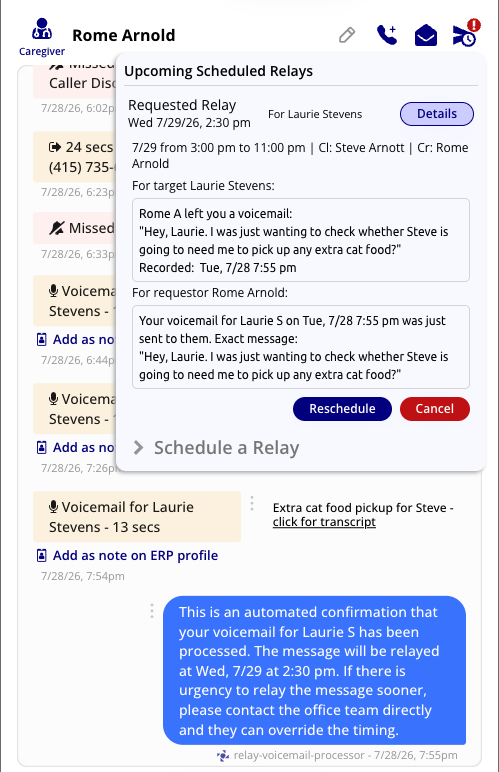
| Text | A relay channel opens until the shift ends. Each message is labeled with the sender's first name and last initial. | CareQB creates a scheduled relay, tells the sender when it will go out (just before their next shift together), and opens the channel then |
| Call | The caller picks who to reach from a short list, and CareQB connects them. Both hear that the call is recorded. | The caller can leave a voicemail. It's transcribed and sent as a scheduled relay text. |
Rules worth knowing
- Caregiver calls can only reach the client's primary contacts. Texts can reach a wider list. No primary contacts means the caller is told nobody can be reached.
- One text relay at a time per person. To reach someone else, they reply END RELAY first.
- Running late is an exception. If a caregiver texts that they'll be late, the channel opens immediately so the family knows.
- Unclear target? CareQB replies with the list of options. If it still can't tell, it asks your team (Relay requires user input).
What your team can do
- See everything. Relay texts and calls are logged like any other conversation.
- Message one side privately during a live relay. The other person doesn't see it, and the recipient doesn't know it's from staff unless you say so.
- Join or end any relay call.
- Open a relay manually between any two contacts, at any time. Choose when it closes and write an opening message (we recommend saying why).
- Schedule a relay for a set number of minutes before a chosen shift.
- Close relay at any time. Participants can also text END RELAY or CLOSE RELAY, and channels close automatically when the window ends.
AI moderation
CareQB watches relay messages for things that belong with the office, most often schedule changes.
| Mode | What happens |
|---|---|
| Passive (recommended) | The message goes through, and your team gets a comment flagging it for review |
| Active | The message is blocked, and the sender is told schedule changes go through the office |
Start with Passive. Switch to Active only if you see misuse.
Rolling it out
- Designate a relay line and set the time window.
- Make sure each client has the right primary contacts.
- Share the client & family guide and the caregiver guide, or use Send Relay Explainer from a chat.